Published by IPTV Subscription Review · Prices checked August 2026
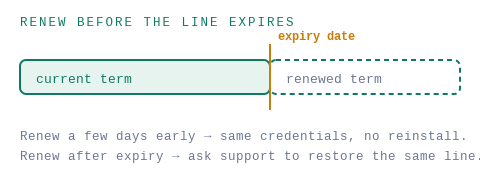
Start in the billing account used for your original purchase. Check your provider's renewal instructions, expiry date and whether a new order extends your existing line before you pay. Some providers keep the same credentials after renewal; others issue new ones. Save your current account details and ask support if the process is unclear.
Disclosure: eight of the subscriptions on this page — TereaTV, FreeGoTV, VocoTV, BexyTV, KroozTV, ViewTVY, VinomTV and EarthWebTV — are operated by the same network that publishes this site, which is why we can publish verified plan figures for them. Everything else listed is a third-party service, flagged as unverified. How ownership affects this comparison.
Before renewing, confirm whether your plan renews automatically, when access expires and whether the provider will extend your existing line. The answer can differ by provider and payment method.
Check the expiry date and account terms before placing a renewal order.
Two ways this goes
A reminder gives you time to confirm the correct order path; it does not guarantee that the provider will keep the same line or credentials.
Before expiry
Open the billing account used for the original purchase
Check whether auto-renewal is enabled
Ask whether a new payment extends the existing line
Confirm the term, connection count and renewal price
Save the order confirmation and new expiry date
After access has lapsed
Check whether the account offers renewal or a new purchase
Contact support if the existing line cannot be extended
Confirm whether new credentials or a server address will be issued
Save current player settings before changing them
Test access only after the provider confirms activation
Why here: Existing customers can check the renewal options in their billing account; confirm whether the new order extends the same line.
Strength: Provider-listed plan terms that still need a peak-time trial, and the six-month plan already hits $10 a month — you do not have to commit to a year to get the best rate.
Trade-off: The annual plan costs $120 while two rivals charge $100 for the same twelve months.
Why here: Client area shows the renewal date and the matching plan on one screen.
Strength: Extra devices cost $5 each rather than a full extra plan — six simultaneous streams is $40 a month, which works out to $6.67 per device, the lowest per-device rate here.
Trade-off: The six-month plan is $65 where TereaTV and ViewTVY charge $60 for the same term.
Why here: Straightforward store renewal — the same product, re-purchased against your account.
Strength: Installs from a short Downloader code (3864080), and extra devices are $5 each — the same per-device economics as VocoTV without the sideloading detour.
Trade-off: Fewer regional packs than TereaTV or FreeGoTV, and the six-month plan is $65 rather than $60.
Use the original billing account to check the available renewal options. If the provider does not explain whether a new payment restores the old line, ask support before purchasing again. Activation time varies; keep the order confirmation until access works.
If new credentials or a server address are issued, follow the provider's setup instructions. Whether favourites and settings survive depends on the player and where it stores them, so record your current configuration first.
Why annual plans catch people out
Annual renewal terms differ by provider and payment method. Check the order confirmation or billing portal for the expiry date, automatic-renewal setting and cancellation terms; do not assume a reminder email will arrive.
Record the expiry date and set a reminder a week early. That gives you time to compare the renewal price, test whether the service still meets your needs and contact support if your existing line cannot be extended.
Renew, or move?
Renewal is a useful moment to reconsider three things: did the service hold up during the hours you use it, did support resolve problems, and is the renewal price acceptable compared with available plans?
If the price has changed, ask the provider for the current terms in writing. Do not assume it will match an older or new-customer offer.
Do not stack terms
Before paying early, confirm whether the new term starts immediately or is added after your existing expiry date. Without that confirmation, it is easy to misunderstand how much access you are buying.
A reminder one week before expiry leaves time to compare terms without paying months ahead.
Questions people ask before buying
How do I renew my IPTV subscription?
Use the billing account from your original purchase, follow that provider's renewal instructions and confirm the new expiry date and account details before closing the order.
Will I lose my settings when I renew?
That depends on whether the provider extends your existing line or issues new credentials. Check the renewal confirmation before changing anything in your player.
Do IPTV subscriptions renew automatically?
Some do and some do not. Check the billing portal and terms for your particular plan; keep your own expiry reminder either way.
Can I renew with a different plan?
Often, but a change in term or connection count may create a new order rather than extend the old line. Confirm the effect with the provider first.
Will my favourites and settings survive a renewal?
Player-stored favourites may remain, but a new username or server address can require setup changes. Save your current details and follow the provider's instructions.
Can I change plan at renewal?
Ask the provider whether the new plan extends the current subscription or starts a separate one, and confirm the new price and expiry date in writing.
The bottom line
Diary the date, renew a few days early through the same account, and use the moment to ask whether the last twelve months earned the next twelve.